Android TV · Google TV Screensaver
Your memories deserve the biggest screen in your home
Your hard drive is full of moments you've already forgotten.
Carousel brings them back.
Those vacation shots, birthday laughs, and quiet morning moments
sitting unseen on your phone.
Carousel puts them where you'll actually see them.
Send photos to your TV in seconds
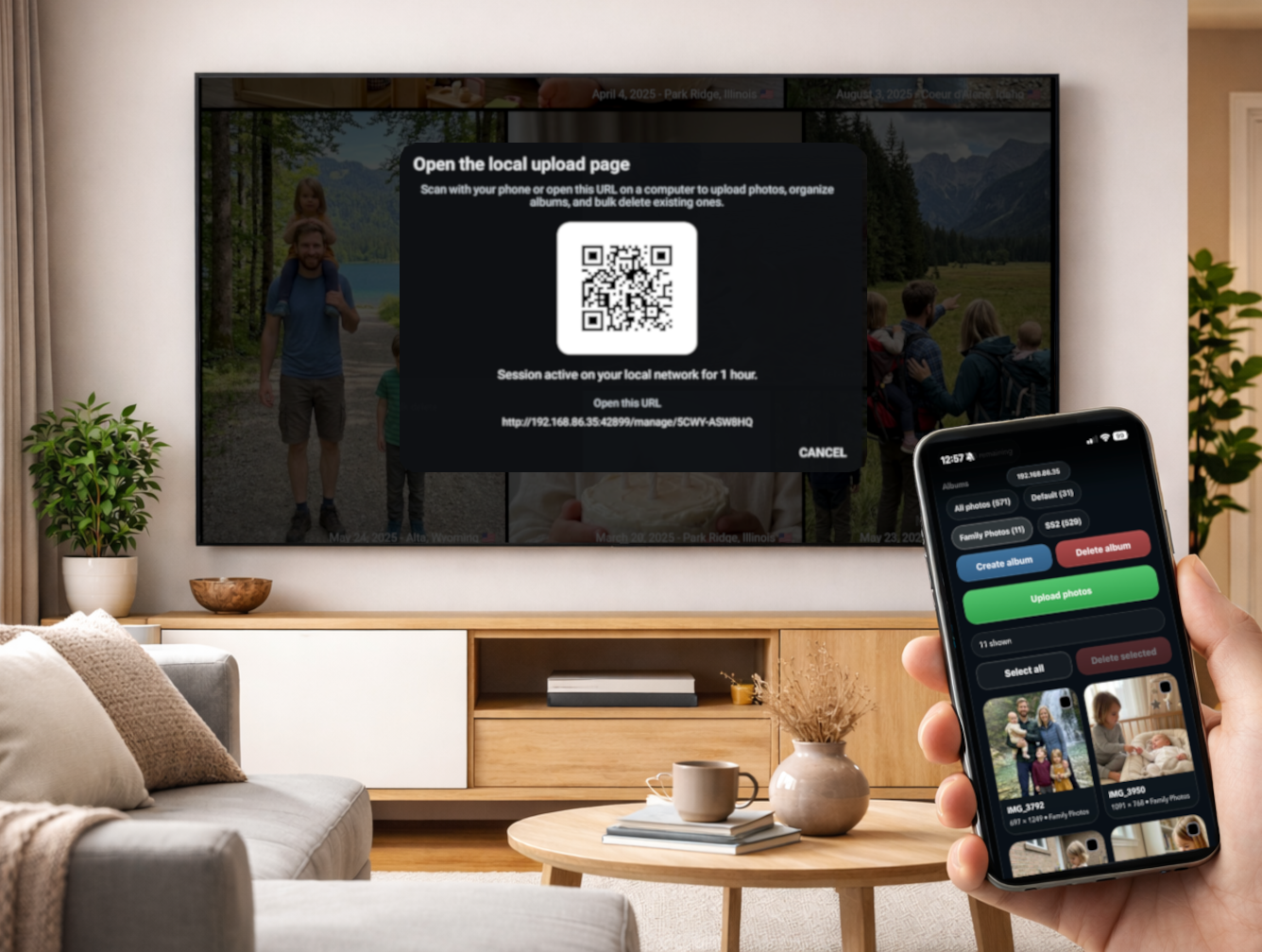
Scan a QR code on your TV, and a local upload page opens on your phone or laptop. Add photos, create albums, and they appear on screen — no app install, no account, no friction.
- Upload directly from your phone or computer
- Organize into albums as you go
- Works over your home network — nothing leaves your house
Connect to your existing photo libraries
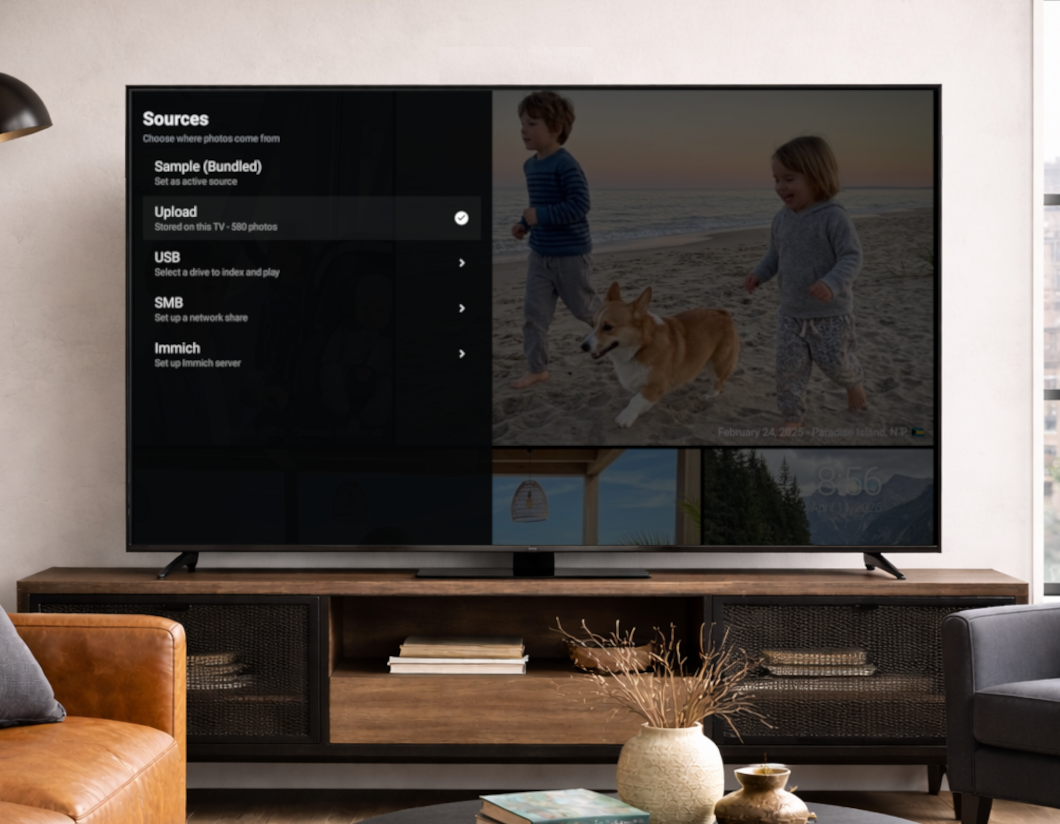
Don't move your photos — bring Carousel to them. Connect a USB drive in seconds, browse a NAS with local auto-discovery, or link your self-hosted Immich server for full album access.
- USB plug-and-play, no configuration needed
- SMB / NAS with automatic local network discovery
- Rich Immich support with album and person filtering
- Built for large libraries with thousands of photos
Every way your photos live
Carousel meets your photos where they are.
USB Drive

Export your existing macOS Photos library, or any other photo collection, to a USB drive. Plug it in and Carousel picks it up automatically.
NAS / SMB

Connect to Synology, QNAP, or any SMB share on your home network. Local auto-discovery makes setup painless.
Immich

Rich integration with your self-hosted Immich server. Browse by album, places, person, or date — all rendered on the big screen.
Phone Upload
Scan the QR code on your TV and upload photos from any device on your network.
No app install required.
Private by design. Always.
Carousel was built with one rule: your memories are yours.
No account creation. No mandatory cloud upload. No social features.
Your family photos stay on your devices — on your network, under your control.
Everything included
A premium experience, beyond a simple slideshow.
Native TV Screensaver
Integrates directly with Android TV & Google TV's screensaver system — activates automatically when idle.
Date Display
Shows the photo date so old memories feel meaningful again — not just a nameless image on screen.
Location Details
Displays the city and region where each photo was taken, when GPS data is available.
Smooth Premium Slideshow
A polished, cinematic experience designed specifically for large TV screens.
Built-In Content Pickers
Choose exactly which folders and albums to display — full control over what appears on screen.
Large Library Support
Built for thousands of photos. Fast indexing and smooth playback no matter how big your collection.
Common questions
What Android TV devices does Carousel work on?
Carousel works on nearly all Android TV or Google TV devices, including Nvidia Shield, Chromecast with Google TV, Sony Android TVs, TCL Google TVs, and most smart TVs running Android TV OS.
Some OEMs may require additional workaround steps in order to enable setting custom third-party screensavers. Guided steps are provided for you, all handled within the app on your TV.
Does Carousel upload my photos to the cloud?
No. Carousel is privacy-first by design. You never need to create an account or upload photos to a cloud service. Photos stay on your local devices — USB, NAS, or local network upload.
Does Carousel support videos?
All sources except "Upload" support video playback interleaved with your photos.
Video support is turned off by default and can be enabled in the Customization menu.
How do I upload photos from my phone?
Open Carousel on your TV and choose Upload as your source.
Your TV will display a QR code — scan it with your phone or open the URL on your computer.
A web page opens where you can select and upload photos directly.
No additional app or downloads needed.
Does Carousel work with Immich?
Yes. Carousel has rich Immich integration allowing you to filter by albums, persons, places, or recent photos.
Carousel will automatically discover instances on your network hosted on the default Immich port.
Point it at your Immich server address, and you can browse and display photos directly from your self-hosted library on the big screen.
Is Carousel free?
Carousel is available on the Google Play Store free up to 100 photos. Download it and start displaying your photos immediately.
A premium subscription or lifetime purchase unlocks unlimited photos, limited only by your storage.
Can I connect a NAS or network drive?
Yes. Carousel supports SMB network shares and includes local network auto-discovery, making it simple to connect Synology NAS, QNAP, or any Windows/Linux file share on your home network.
Start seeing your photos again
Try free on Google Play. Works on any Android TV or Google TV device.